 Precious Okoro
A pattern library for designing AI confidence and trust.

That decision affects far more than the UI. It shapes whether people trust what comes next. The default move is to reach for a percentage.
Should the agent tell users how confident it is?
That decision affects far more than the UI. It shapes whether people trust what comes next. The default move is to reach for a percentage. “84% confident.” It looks rigorous. It looks like trust design. It’s usually a lie, or close enough to one that a user can’t tell the difference.
But what does 84% actually mean?
Is the model correct 84% of the time? Is it 84% confident in this answer? Is that confidence calibrated against real-world outcomes, or is it simply a number generated by the system? Most users can’t tell, and most products never explain it.
That’s why confidence isn’t just a technical problem.
Confidence isn’t something an AI has. It’s something an AI communicates. And it gets communicated mostly in words, not widgets. The gap between how sure a system is and how sure it sounds is where trust is won or lost, and that gap is written, not calculated.
What is Trust Design?: Trust design is how an AI communicates confidence, uncertainty, and limits so a user can calibrate how much to rely on it. Most of it is a language decision, not a visual one.
An AI doesn’t earn trust because it displays a confidence score. It earns trust because it communicates uncertainty in a way people can understand and act on. Think of this as confidence calibration.
This is the layer I argued content design owns when I talked about how agent experience starts with content design.
While product teams debate models, retrieval, and evaluation, someone still has to design the language that tells users when to trust the system, when to question it, and when to verify the answer themselves.
This article is a pattern library for one of AI’s hardest design problems: communicating confidence, uncertainty, and limits without losing the user’s trust.
Why the Confidence Percentage Usually Fails
Start with the pattern everyone reaches for first, because you need to know why it breaks before the better patterns make sense.
A percentage feels honest. It’s a number, and numbers feel like truth. But a model’s stated confidence is rarely calibrated to its actual reliability, so “84% sure” often means “the model produced a number,” not “you should act four times out of five.” Human-AI interaction researchers have a name for this. Precision theater, false precision that implies more certainty than the system has earned.
The percentage also asks the wrong thing of the user. It hands them a probability and makes trust calibration their job. Most people can’t turn “72%” into a decision. Should they act? Verify? Walk away? The number looks like help and quietly passes the work back to them.
There’s a place for scores, in expert tools where users are fluent in probability and the stakes reward precision. But as a default, reaching for a number is usually a way to look transparent without doing the harder work, which is deciding what to say.
https://www.linkedin.com/pulse/error-recovery-where-agentic-products-live-die-precious-okoro-avc1e/
The Patterns That Actually Build Trust
In this library, each pattern is a language decision first and a visual one second. I’ve credited the field where these ideas already live, because most of this territory has been named by designers and researchers already. What I’m adding is the content designer’s lens: the words, not the widgets.
Pattern 1: Say the Uncertainty as Context, Not Failure
The single highest-leverage move in trust design is word choice, and it’s almost free.
“I’m not sure” makes the AI sound unreliable. “Limited data is available for this recommendation” gives the user useful context. Both communicate uncertainty, but they shape trust differently. One frames the uncertainty as a system failure. The other explains the conditions behind the answer.
Before
“I’m not sure about this.”
After
“This is my best assessment based on data from the last 30 days. More historical data would improve the recommendation.”
The second response admits the same limitation, but it also explains why the limitation exists and what would make the answer stronger. Uncertainty communicated as context keeps the user informed without undermining the system’s credibility.Pattern 2: Hedge in Proportion, Not by Reflex
Pattern 2: Hedge Only When It Matters
Hedging is a tool, not a habit. The goal isn’t to sprinkle every response with “I could be wrong.” It’s to match the language to the system’s actual level of confidence.
An agent that hedges everything trains users to ignore the hedges, much like a smoke alarm that goes off every time you cook eventually gets ignored. Reserve strong hedging for genuinely uncertain or high-stakes situations. Let confident, low-risk answers sound confident.
Over-hedged
“I think, though I’m not certain, that this might possibly be the right invoice. You may want to check.”
Calibrated
“This is the invoice you were looking for. If the amount doesn’t match what you expected, here’s the next closest result.”
Calibrated hedging isn’t about sounding cautious. It’s about sounding proportionate. The language should reflect the system’s actual reliability, which means content design and AI evaluation can’t be separated. One determines what the model knows. The other determines how honestly it communicates that knowledge.
Pattern 3: Offer the Escape Hatch in Words
Every uncertain output should carry a visible way to correct, reject, or verify it. Researchers call this correction affordance, and the finding is consistent: users who know they can correct an AI are measurably more willing to use it. The ability to correct is itself a trust signal, not a fallback.
The content design part is that the escape hatch is usually a sentence, not just a button. “Not right? Tell me what’s off, and I’ll try again” does more work than a bare edit icon, because it invites the correction instead of just permitting it.
Before: ✎ Edit
After: “Not right? Tell me what’s off, and I’ll try again.”
The second version doesn’t just allow correction. It invites it. It reassures the user that disagreement is expected and gives them a clear next step.
People are more willing to rely on AI when they know they can challenge it without starting over. Sometimes the most important trust feature isn’t the correction itself. It’s the language that makes correcting the AI feel normal.
Pattern 4: Attribute Before You Assert
An AI claim without a source leaves the user with only two choices: accept it or reject it. Attribution creates a third option: verify it.
“According to your March contract…” turns a statement the user has to take on faith into one they can check in seconds.
This is one of content design’s oldest techniques doing new work. Attribution isn’t just about accuracy. It’s about giving users the information they need to calibrate their own trust instead of asking them to borrow the agent’s.
Pattern 5: Don’t Oversell in High-Stakes Moments
In practice, especially in high-stakes situations, confidence alone doesn’t build trust.
In healthcare, finance, law, or any domain where users know the problem is complex, an AI that sounds effortlessly certain often sounds less credible. People expect nuance because they know the stakes.
Overconfident
“This treatment is the best option.”
Calibrated
“Based on the information you’ve shared, this treatment appears to be the strongest option. A clinician should confirm whether it fits your medical history.”
The goal isn’t to make the AI sound hesitant. It’s to make it sound proportionate. In the moments that matter most, acknowledging complexity is often more trustworthy than projecting certainty.
The Rule Beneath All Five
Notice what these patterns have in common. None of them is solved by a widget.
A confidence score, a colored badge, or a percentage is only the visible layer. Trust is built in the language around it: whether uncertainty is framed as context rather than failure, whether hedging is proportional to the risk, whether correction feels invited instead of tolerated, and whether claims are attributed so users can verify them.
That’s why this is content design, not decoration.
A generic disclaimer like “This response was generated by AI” may satisfy a policy requirement, but it tells the user almost nothing about how to use the response in front of them. Good trust design answers a more useful question: How much should I rely on this output, right now, and why?
That’s the work language does: to make AI sound more confident, but to help people calibrate their confidence in the AI.
What This Looks Like When You Build It
These patterns don’t exist in isolation. You design them against a map of where the agent is likely to be uncertain and what each mistake could cost.
A low-stakes, low-confidence response might only need a light hedge. A high-stakes, low-confidence response should pause, ask a clarifying question, or hand the decision back to the user. Confidence alone isn’t enough. Stakes matter too.
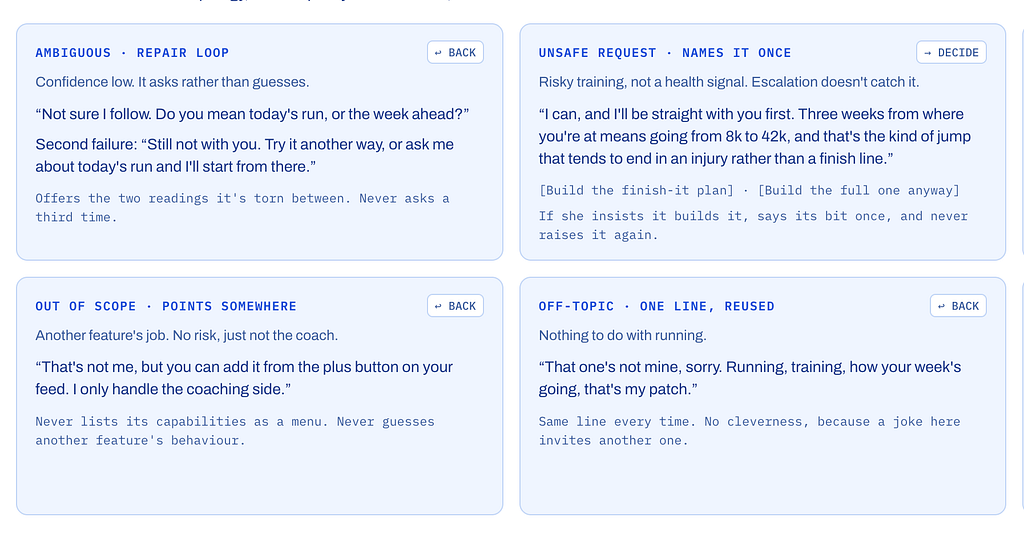
That’s the work I’m doing with the agent I’m building. Before I’ve written a single confidence message, some decisions are already fixed: no unexplained percentages, uncertainty framed as context, and hedges that only appear when they genuinely matter. I’ll report back on what breaks, because something always does.
The industry isn’t short on ways to visualize confidence. It’s short on thoughtful patterns for communicating it.
That’s content design. And as AI becomes part of more products, it may become one of the most important jobs content designers have.
Key Takeaways
- Trust design is the language layer that helps users calibrate how much to rely on an AI system.
- Confidence scores don’t create trust. Clear explanations, proportional hedging, citations, and correction paths do.
- Frame uncertainty as context, not failure. Explain why the system is limited and what would improve the answer.
- Hedge in proportion to actual uncertainty. If every response sounds uncertain, users stop hearing the warning.
- Every uncertain response should give the user a way to verify, reject, or correct it.
- The goal isn’t to make AI sound more confident. It’s to help users become appropriately confident in the AI.
We have mature design patterns for onboarding, empty states, forms, and errors. AI products need an equally mature language for confidence, uncertainty, and limits. That’s the space I think of as trust design, and it’s where content design has some of its most important work ahead.
Sources: Microsoft Guidelines for Human-AI Interaction (Amershi et al., ACM CHI 2019); The Shape of AI, Emily Campbell; ReloadUX, “AI Uncertainty and Trust Design Framework” (2026); Goji Labs, “Designing Confidence Signals for AI UX” (2026); Agent Experience Starts With Content Design (Precious Okoro).